
If you work with APIs, config files, or any kind of structured data, you’ve almost certainly run into a JSON error at some point — a missing comma, an unquoted key, a stray bracket — and spent longer than you’d like squinting at a wall of text trying to find it. That’s exactly the problem we built this tool to solve.
Kings Tools is a free online JSON formatter and validator. Paste your JSON in, and in a fraction of a second you’ll know whether it’s valid, exactly where it breaks if it isn’t, and you can beautify or minify it depending on what you need it for. No sign-up, no file upload, no software to install — it runs entirely in your browser.
Below, we’ll walk through how to use the tool, what actually makes JSON valid or invalid, how JSON validation compares across different environments (command line, code editors, and a few popular programming languages), and answer the most common questions we hear about JSON formatting and validation.
What This Tool Does
Our JSON formatter and validator online tool has three modes, and you can switch between them instantly:
Beautify (Format) — Takes minified, compressed, or just messily-indented JSON and reformats it into clean, properly indented, human-readable structure. This is the mode most people reach for when they’ve copied a JSON response from an API or a log file and need to actually read it.
Minify — The opposite operation. Strips out all unnecessary whitespace, line breaks, and indentation to produce the smallest possible JSON payload. Useful when you’re preparing JSON for production use, reducing file size for a config, or optimizing an API response.
Validate — Checks whether your JSON is syntactically correct according to the JSON specification, and if it isn’t, tells you the specific line and column where the parser broke. This is the mode that answers the question “is this JSON valid?” without you having to guess.
Because everything runs client-side in your browser, nothing you paste into the tool is ever uploaded to a server, logged, or stored anywhere. That matters if you’re working with sensitive API responses, internal config files, or anything you wouldn’t want passing through a third-party server — a genuinely free online JSON formatter and validator shouldn’t require you to trust anyone with your data. You can read the full detail in our Privacy Policy.
How to Use the JSON Formatter and Validator
Using the tool takes a few seconds:
- Paste or type your JSON into the input panel on the left
- Choose a mode — Beautify, Minify, or Validate — from the toggle above the panels
- The output appears instantly in the right-hand panel
- If your JSON is invalid, the status bar tells you exactly what’s wrong and where
- Use the Copy button to grab the formatted result, or Clear to start over
There’s no character limit gate, no forced account creation, and no waiting for a server round-trip — because there isn’t one. The formatting and validation logic runs directly in your browser’s JavaScript engine.
What Makes a Valid JSON File?
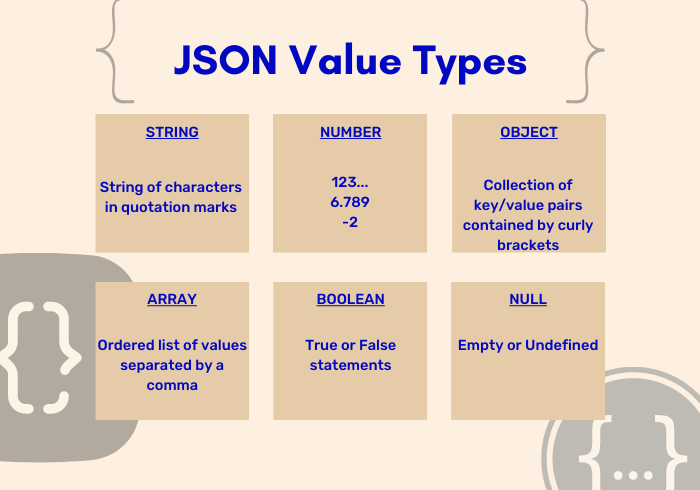
JSON (JavaScript Object Notation) has a simple but strict specification, and understanding it makes debugging a lot faster. A valid JSON file follows rules like:
- Keys must be double-quoted strings.
{name: "value"}is invalid — it needs to be{"name": "value"}. Single quotes aren’t allowed either. - No trailing commas.
{"a": 1, "b": 2,}is invalid JSON — that trailing comma after the last value breaks the parser, even though it’s common in JavaScript object literals. - Strings must use double quotes, not single quotes.
'hello'is invalid;"hello"is valid. - Numbers can’t have leading zeros (except for the number 0 itself), and can’t include values like
NaN,Infinity, orundefined— those are JavaScript concepts, not JSON. - Every opening bracket needs a matching closing bracket —
{needs},[needs]. - No comments. Unlike JSON5 or JSONC, standard JSON doesn’t support
//or/* */comments at all.
Here’s a valid JSON format example, just to make this concrete:
{
  "name": "Kings Tools",
  "type": "utility",
  "features": ["format", "minify", "validate"],
  "isFree": true,
  "version": 1
}
And here’s what commonly makes JSON invalid — an example with a trailing comma and an unquoted key:
{
  name: "Kings Tools",
  "version": 1,
}
Paste either of those into the validator above and you’ll see exactly why one passes and the other doesn’t.
Common Reasons JSON Fails Validation
When people ask “why is my JSON not formatting correctly,” it almost always comes down to one of these:
- Trailing commas — the single most common issue, especially when JSON is hand-edited or copy-pasted from JavaScript code
- Unescaped special characters inside strings, like an unescaped double quote or backslash
- Mismatched or missing brackets/braces, often from manually editing deeply nested structures
- Using single quotes instead of double quotes
- Duplicate keys within the same object — technically some parsers tolerate this, but it’s not spec-compliant and can produce unpredictable results
- Non-JSON data types, like JavaScript’s
undefined, functions, orDateobjects that don’t have a native JSON representation
A malformed JSON checker like ours won’t just tell you “invalid JSON” — it points to the specific character position so you’re not scanning line by line.
JSON Validation Beyond the Browser
While our tool covers the vast majority of day-to-day formatting and validation needs, it’s worth knowing how JSON checking works in other contexts you might encounter:
Command line — Tools like jq let you validate and pretty-print JSON directly from the terminal (jq . file.json), which is useful in scripts or CI pipelines where you can’t open a browser.
Code editors — Most modern editors, including VS Code, have built-in JSON validation. VS Code specifically will underline syntax errors in .json files automatically, and can validate against a JSON Schema if one is referenced.
Python — The built-in json module’s json.loads() function will raise a JSONDecodeError with a line and column number if the JSON is invalid, which is functionally similar to what our validator shows you, just from within a Python script instead of a browser.
Java — Libraries like Jackson or Gson handle JSON parsing and will throw parsing exceptions on malformed input, often used for JSON format validation inside larger Java applications.
R — Packages like jsonlite provide validate() and fromJSON() functions for checking and parsing JSON within R scripts, commonly used in data analysis pipelines.
The core JSON specification is identical across all of these — a file that’s valid in our browser-based tool will be valid in Python, Java, or any spec-compliant parser, because JSON validity isn’t language-specific. It’s a universal format.
JSON Schema Validation vs. JSON Syntax Validation
It’s worth being clear about a distinction that trips people up: syntax validation (what this tool does) checks whether your JSON is structurally well-formed according to the JSON spec. JSON Schema validation is a different, more advanced concept — it checks whether your JSON matches a specific structure you’ve defined, like requiring certain fields to exist, enforcing data types, or setting value constraints.
Here’s a simple JSON schema validation example to illustrate the difference. This schema requires a name field of type string and an age field of type number:
{
  "type": "object",
  "properties": {
    "name": { "type": "string" },
    "age": { "type": "number" }
  },
  "required": ["name", "age"]
}
JSON like {"name": "Sam"} would pass basic syntax validation (it’s well-formed JSON) but would fail schema validation, because it’s missing the required age field. Our tool currently focuses on syntax validation and formatting — the more common day-to-day need — but it’s a distinction worth understanding if you’re working with APIs that enforce strict schemas.